If you set an electric fireplace to 72°F and the heater stops, the number alone does not tell you that the room reached 72°F. On some controls, the display shows the temperature you requested—not the temperature being measured. The sensor may be in the appliance, in the remote, or left unclear by the available documentation.
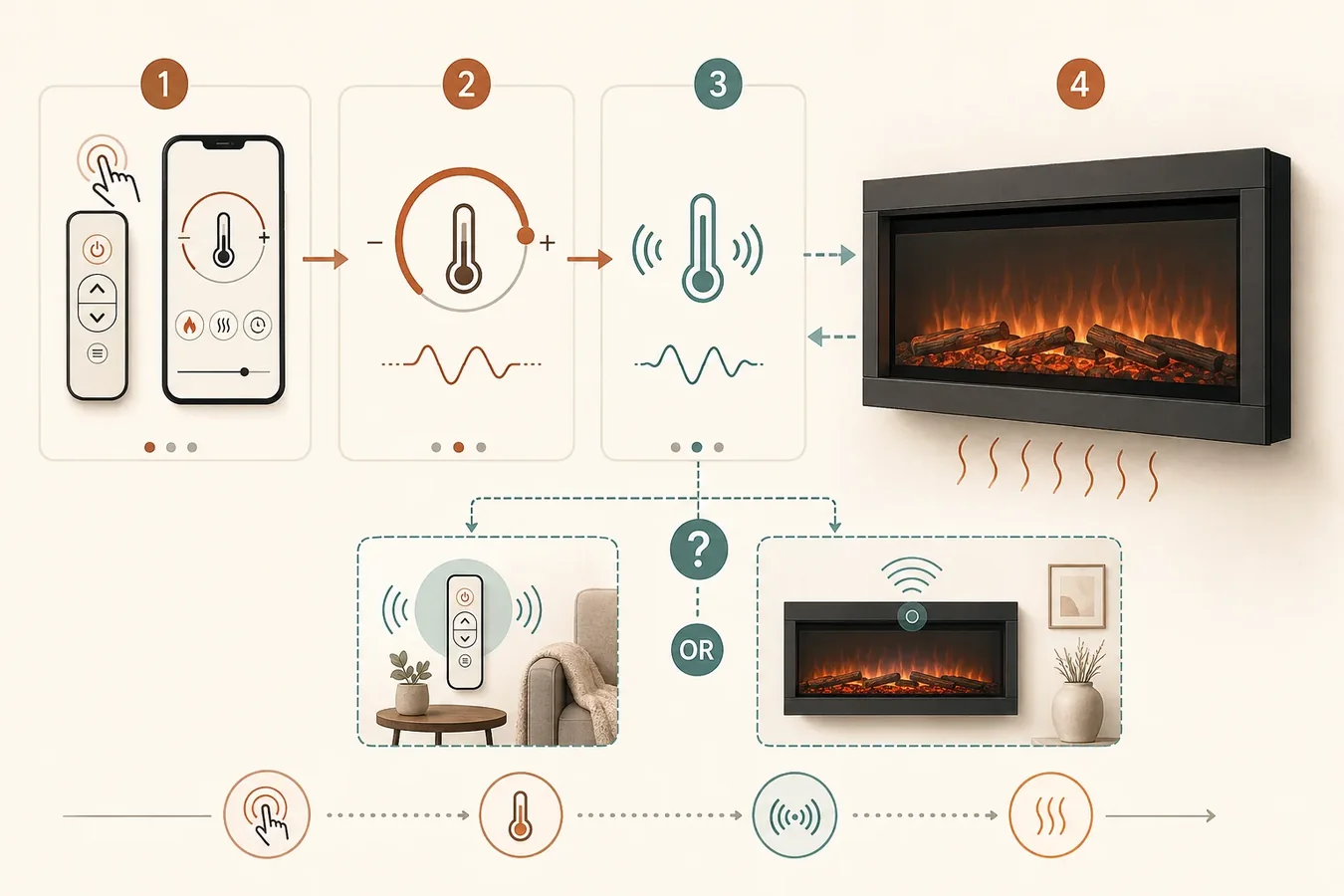
Treat the thermostat as a four-link chain: control → displayed value → sensor → heater response. Match all four links to the exact model and manual revision before calling the behavior normal, inaccurate or faulty.
That distinction also matters before purchase. “Includes thermostat” is incomplete if the product page never tells you which control owns it, what its range is, where it senses temperature, or whether it offers a constant-heat mode.
First challenge the number on the screen
A thermostat needs a target and a measurement. Those two temperatures can appear in different places—or only one may be shown.
Suppose you press the temperature-up button until the remote reads 72°F. The display might mean:
- Desired setpoint: “Keep heating until the sensed temperature reaches this target.”
- Measured temperature: “This is what the sensor reports now.”
- A temporary setting display: the control shows the new setpoint for a few seconds, then returns to another screen.
You cannot determine which meaning applies from the digits alone. The control legend and operating sequence in the exact manual decide it. If the obstacle is identifying the temperature button, heat icon or changing display, the electric fireplace remote symbols guide owns that control-reading task.
This is also why comparing the fireplace display with a wall thermostat can mislead. Even if both numbers are valid, they may represent different things: one could be a setpoint while the other is a measurement. First establish what each number claims to be; only then is a difference meaningful.
Trace four handoffs before judging the thermostat
Build one row for the exact model instead of starting with a category-wide answer.
| Link | Question to answer | Strong evidence | Hold condition |
|---|---|---|---|
| Control | Where is the target changed: remote, app or appliance panel? | Exact manual operating section or exact-model product owner | “Remote included” without thermostat-control scope |
| Display | Does the number mean setpoint, sensed room temperature, or a temporary setting? | Manual text that names the displayed value and sequence | A temperature number with no defined meaning |
| Sensor | Which component supplies room temperature? | Exact model/manual names the remote sensor, appliance sensor or another location | Location copied from another series or guessed from appearance |
| Heater response | What should happen below and at the target? | Manual states the thermostat-mode on/off behavior | Generic assumption that every feature powers down |
| Alternate mode | Can the heater run continuously or bypass a setpoint? | Exact manual or product specification defines the mode | A “thermostat” badge with no mode explanation |
The electric fireplace specifications guide keeps model, voltage, heat, controls and other product facts in their own fields. Add these thermostat fields to the same discipline. A complete row can support a comparison; a product badge cannot.
Use three evidence labels:
- Documented: the exact model and revision state the field directly.
- Conflicting: two passages that should govern the same model/revision disagree.
- Unknown: the available exact-model owners do not answer it.
“Conflicting” is not a weaker synonym for unknown. It identifies a specific manufacturer question. Preserve both passages and ask which one controls. Do not choose the passage that best fits a general explanation.
Two SimpliFire manuals put the sensor in different places
The SimpliFire documentation shows why a universal answer fails.
The earlier Allusion SF-ALL40/48/60/84 manual, Rev S 2/24 says the remote display represents the desired temperature. It locates the actual room-temperature sensor behind the glass front and describes the heater cycling off when the set temperature is reached and back on when the sensed temperature falls below it.
The current Allusion Edge SF-ALLE50/60/78/100 manual, Rev C 10/25 again treats the remote number as the desired setpoint. Its operating text says the room-temperature sensor is hidden inside the remote control. Later, however, its troubleshooting text describes the temperature being measured by a thermistor in the appliance. Those statements produce a manual conflict, not permission to announce either location as fact.
Touchstone’s current Sideline Elite 50 model 80036 product page publishes a different kind of record: thermostat adjustment from 68°F to 88°F or a constant-on setting, with remote and app controls. The page is useful for range, mode and control surface. It does not, by itself, establish where room temperature is sensed.
| Exact product owner | Control and display | Documented sensor | Expected heat behavior | Record result |
|---|---|---|---|---|
| SimpliFire Allusion SF-ALL series, Rev S 2/24 | Remote; displayed number is desired temperature | Behind the glass front | Heater cycles around the set temperature | Model-bound chain documented |
| SimpliFire Allusion Edge SF-ALLE series, Rev C 10/25 | Remote/app context; displayed number is desired setpoint | Operating section: remote; troubleshooting section: appliance thermistor | Heater response is described around the desired temperature | Contact manufacturer about the conflict |
| Touchstone Sideline Elite 50, model 80036 | Remote/app; 68–88°F or constant on | Unknown from the cited product owner | Thermostat and constant-on modes are offered | Range and modes documented; sensor held |
None of these rows should be transferred to the other two. A shared brand or similar-looking remote is not enough; the exact model family and document revision stay attached to every fact.
Remote placement matters only when the remote is the sensor
If the exact manual says the temperature sensor lives in the remote, the remote is no longer just a transmitter. Its location becomes part of the thermostat’s input. Moving it to a different part of the room can expose the sensor to a different local temperature, so a changed heater cycle may reflect changed sensing rather than a changed setting.
If the manual says the appliance senses temperature, moving the remote does not relocate that appliance sensor. Remote-placement advice copied from a different control design would solve the wrong problem.
Use this sequence:
- Record the exact fireplace model and manual revision.
- Confirm that the number displayed is the setpoint or a measured value.
- Find an explicit sentence naming the sensor location.
- Follow that model’s placement and operating instructions only.
- If two governing passages disagree, keep the sensor field “conflicting” and contact the manufacturer with both page references.
If the remote itself is missing, damaged or no longer paired, that is a separate identity and compatibility decision. Use the electric fireplace remote replacement guide rather than treating a replacement remote as a generic thermostat accessory.
A thermostat stop is not a timer or a protective shutdown
Normal thermostat cycling is only one reason heat can stop. Start with what stopped, when it stopped, and whether the sensed temperature should have reached the target.
| Observation | Best first interpretation | Next owner |
|---|---|---|
| Heater turns off near the documented target and later resumes below it | Normal thermostat cycle is plausible | Compare the observation with the exact manual’s heater logic |
| Heater continues without waiting for the selected target | Constant-heat mode may be selected, if the exact model documents one | Check the current mode and control display |
| Unit stops after a selected duration | Timer behavior is more plausible than thermostat response | Confirm the timer symbol and duration in the control guide |
| Heat stops repeatedly while the room is still below the setpoint, or resumes only after cooling | Do not relabel it as a normal thermostat cycle | Use the recurring-shutdown path and manufacturer support |
| Entire unit ignores commands rather than only cycling the heater | Startup, power or control state may be the real branch | Follow the model-bound startup sequence |
For repeated heat stops below the target, use the recurring shutdown diagnostic and the manufacturer’s support path. If the entire unit ignores commands, follow the model-bound startup sequence.
The flame effect and heater can also have separate controls. A manual that says the heater cycles at the setpoint does not prove that the flame effect, display or whole appliance should switch off. Keep the observed component in the note.
If the unit produces smoke, a burning odor, water exposure, repeated electrical trips or another immediate hazard, stop using it and follow the manual and qualified support route. Those conditions are not thermostat experiments.
Write one model record before trusting a thermostat claim
For an installed fireplace, photograph the rating label and save the matching manual revision. For a purchase, ask the seller or manufacturer for those exact owners before relying on “thermostat included.” Keep the result as compact as this Edge example:
SimpliFire Allusion Edge SF-ALLE series / Rev C 10/25: thermostat setting is available from the remote, with app control also documented. The remote display is the desired setpoint. Sensor location is conflicting: the operating section names a sensor hidden in the remote, while troubleshooting names an appliance thermistor. The heater is described as responding around the desired temperature. Manufacturer confirmation is required before using remote placement to explain a cycle.
An app is not automatically a second thermostat. It may simply send the same setting to the appliance, or it may expose features the remote does not. The smart electric fireplace guide shows how to keep app capability, fallback control and connectivity claims tied to the exact model.
The record is complete when it explains the four handoffs—or names the one field the available documents cannot settle. For the Allusion Edge example, the honest output is not “the sensor is in the remote” or “the sensor is in the fireplace.” It is: the displayed number is a desired setpoint; Rev C 10/25 conflicts on sensing location; confirm the governing passage with SimpliFire before using placement to explain the heater cycle.