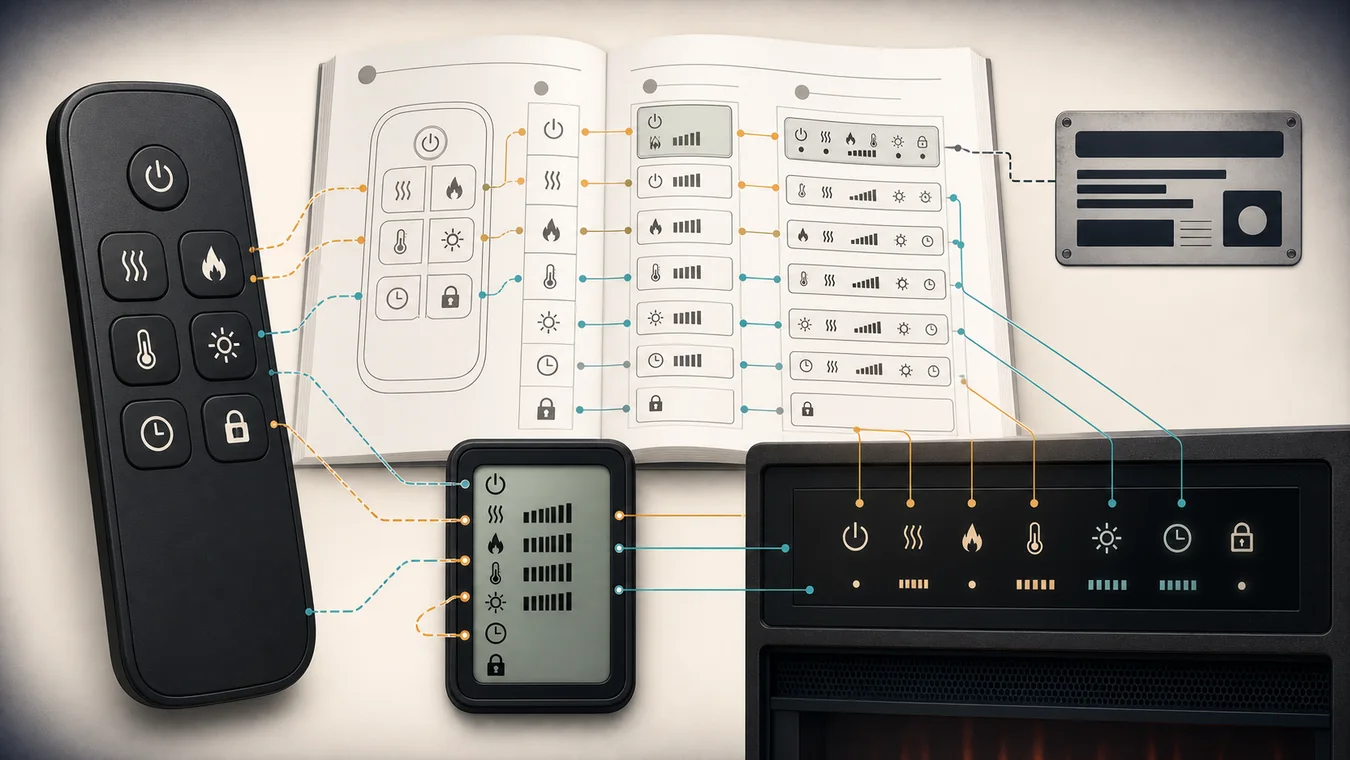
The icon is only half the instruction. A mark printed on a remote button asks for an input; the same-looking mark on a remote screen may report a setting; a symbol or short code on the fireplace itself may describe what the appliance did—or why it did not do it.
Before pressing a mystery combination, photograph four things together: the front of the remote, its back label, any remote LCD, and the fireplace display. Then identify the fireplace model and open its current official manual. If the model, remote, manual, and symbol location do not agree, the meaning is not settled yet.
The useful answer is therefore not “three wavy lines always mean heat.” It is “on this model, on this surface, this mark maps to this documented function, and this is the response the manual says to expect.”
First decide where the symbol lives
Treat the remote and fireplace as three separate reading surfaces. Do not crop the photo so tightly that the surrounding buttons or display are lost; adjacency often tells you which manual diagram you are looking at.
| Where you see it | What it can represent | Evidence that closes the meaning | Common wrong turn |
|---|---|---|---|
| Physical remote button | A command the user can send | Exact remote diagram, function name, press or hold instruction | Calling the button proof that the function is currently active |
| Remote LCD | A remote setting or status, such as a setpoint, timer, lock, battery, or mode | Exact LCD legend plus the state before and after the input | Treating every displayed mark as a fireplace error |
| Fireplace display or indicator | An appliance setting, temporary readout, lock or disable state, or model-specific code | Exact control and display table plus the expected appliance response | Reusing a code from a similar-looking model |
The first row is an input. The other two rows are outputs or states. They may occur together, but they are not interchangeable. Pressing a heater-marked button, for example, may make the remote show a set temperature while the fireplace briefly shows room temperature; on another model, the firebox may show a heat level instead. The mark alone cannot tell you which event occurred.
Start with the model plate rather than the remote’s silhouette. If you are unsure which number identifies the appliance, the electric fireplace specifications guide explains how to separate model identity from dimensions, voltage, and marketing names. If the official document is missing, use the electric fireplace manual guide before interpreting the controls.
Use the icon shape as a search term, not an answer
Common icon families are still useful—but only as words to search inside the correct PDF. Try the manual’s own vocabulary, because the drawing may not be searchable.
| Shape you notice | Useful manual search terms | What still has to be verified |
|---|---|---|
| Broken circle with a vertical line | power, standby, on/off | Whether it energizes the unit, wakes controls, or puts it in standby |
| Wavy lines | heat, heater, heating, heat disable | Whether it commands heat, reports heat, or appears when heat is unavailable |
| Flame, sun, or radiating circle | flame, effect, brightness, light, ember, color | Which visual layer changes and how many presses cycle it |
| Thermometer, plus, or minus | thermostat, temperature, setpoint, increase, decrease | Whether the display is showing the setpoint or sensed room temperature |
| Clock, moon, or hourglass | timer, sleep timer, schedule | Whether the number is elapsed time, time remaining, or a shutdown setting |
| Lock or key | lock, child lock, controls lock | Which controls are locked and which documented input unlocks them |
Those rows are deliberately not definitions. Dimplex’s current FAQ, for example, says a lock symbol on a Dimplex remote indicates child-lock mode, then directs the owner to the manual for the actual removal steps. That is useful brand-scoped evidence, not permission to apply one unlock sequence to every remote.
The same restraint applies within a brand. Touchstone’s current manual index maps different item and model numbers to different PDFs. Two black remotes with flame, heat, and clock shapes may belong to different series and expose different settings. Appearance can help you search; the model-to-manual match decides which result applies.
A button and a display can tell different stories
Current manuals show why the response must be recorded alongside the icon. In the Dimplex Prism BLF3451/5051/7451 manual, pressing a button can cause the Floating Display to show intake temperature temporarily. The same display position is also used for thermostat adjustments, timer values, and model-specific brightness or color-theme states. A visible letter or number therefore needs the preceding input and the current operating state before it can be read correctly.
The current Dimplex Revillusion family guide gives a different example. Within the models listed in that document, the fireplace display can show --- when heat is disabled and LOC when hidden touch controls are locked. Those are appliance-display responses. They are not labels printed on a remote button, and they should not be transferred to an unlisted model.
Touchstone’s current Sideline manual makes the separation explicit by organizing controls into “button,” “function,” and “action & indication.” Within that manual family, flame brightness can appear as F0 through F5, while heat can appear as H0 through H2. The remote button starts the action; the displayed value and physical change confirm which setting the appliance accepted.
For one press, capture the whole chain:
| Moment | What to record | Why it matters |
|---|---|---|
| Before | Power state, flame state, heater state, visible number or icon | A display may be reporting the state that already existed |
| Input | Exact button, short press or documented hold, number of presses | Repeated presses often cycle rather than toggle |
| Remote response | LCD icon, number, blink, or no change | Shows what the transmitter believes it sent or stored |
| Fireplace response | Display code, indicator, flame or heat change, or no response | Tests the manual’s expected appliance behavior |
A warm fan continuing briefly after heat is turned off, a setpoint flashing before room temperature returns, or an icon remaining visible in heat-only mode may all be documented behavior for one model. None should be relabeled as an error without that model’s manual.
Write down one symbol, not the whole remote
You do not need to redraw every button. Build one compact record around the mark that is blocking you. The restraint keeps an uncertain symbol from borrowing certainty from controls you already recognize.
| Field | Entry for this one symbol |
|---|---|
| Fireplace identity | Brand, full model or item number, market |
| Remote identity | Back-label number or the exact remote shown in the manual |
| Document | Official manual title, revision or date, page |
| Observed surface | Physical button, remote LCD, or fireplace display |
| Visual context | Photo plus adjacent buttons, labels, numbers, and current state |
| Documented function | The manual’s function name in its own words |
| Documented input | Short press, repeated press, or stated hold—only if the manual specifies it |
| Expected response | What should change on the remote, display, flame, heater, timer, or controls |
| Actual response | What changed, including “nothing” |
The record is complete only when the function and expected response come from the same applicable manual. A reseller PDF with a close product name can help locate a document, but it cannot close the record until the model list and remote diagram match the appliance in front of you.
If the icon is too worn to identify, use its position and neighboring controls to compare against the exact diagram. If the remote has no back label, photograph the battery compartment and contact the manufacturer with the fireplace model and purchase region. Do not purchase a replacement from the icon layout alone; the electric fireplace remote guide owns the separate receiver, transmitter, and compatibility decision.
If the documented response does not happen, the task has changed
Once the symbol, input, and expected response are clear, a mismatch is no longer a translation problem. Route it by what still works.
If neither the local controls nor the remote produce the documented normal state, return to the normal electric-fireplace start path and verify the model’s power and control ownership. If local controls work but the exact remote does not, move to remote identity, battery, initialization, receiver, or manufacturer support rather than trying unrelated button combinations.
If an app is part of the documented control system, compare its state separately; the smart electric fireplace guide covers app and platform capability. If the command is accepted but the visible flame effect is absent, frozen, or partial, the problem belongs to the flame-effect symptom guide, where the exact effect system and service boundary matter.
A code beginning with letters or an unfamiliar repeated pattern may be a settings state, a lock, a disabled feature, or a model-specific fault. Read the exact troubleshooting table before clearing anything. When the manual does not describe the observation—or its prescribed response fails—send the manufacturer the one-symbol record. It is far more useful than “the heat icon does not work” because it includes identity, context, input, and outcome.
Keep the manual page beside the remote
Save the manual under the full model number, not the fireplace’s family nickname. Store the remote photo and the one-symbol record with it. If the appliance is sold, moved, or handed to another household member, that small bundle preserves the difference between a button, a status indicator, and a display message.
The next time the screen changes, compare it with the documented response before searching the icon again. A symbol earns a meaning only when the exact appliance, exact surface, current manual, and observed response all point to the same function.